 WDCH
WDCH
🌐 TikTok Registration, Password Reset & Beginner FAQ Guide
A Complete Breakdown of the International Short-Video Platform's Account Growth Fundamentals and Safety Essentials
❓ What is TikTok?
TikTok is the overseas version of Douyin, launched by China's ByteDance, and has now become a globally popular international short-video social platform. Since ByteDance acquired and integrated Musical.ly in 2017, TikTok has allowed users to freely create, edit, and share engaging short videos ranging from a few seconds to 10 minutes. With its massive global base of young active users and powerful algorithmic recommendation feed, it has become an unmissable goldmine of traffic for cross-border sellers going global.
🛠 Anti-Ban Preparation for Chinese Users Before Registering TikTok
If domestic users do not properly disguise their device before starting an account, logging in directly will easily trigger the system to flag them as mainland users, resulting in instant bans or "zero views" throttling. Please strictly follow these basic overseas configuration steps:
Whether Android or Apple, you must remove the mainland China SIM SIM card(you may use an overseas data-only SIM or keep no SIM inserted at all). At the same time, you must disable the phone's built-in GPS privacy location services。
Change the phone system language globally to English (English) and set the region to your target overseas country. Enable global proxy mode on your scientific networking tool, and ensure the connected node is a clean, uncontaminated pure overseas residential IP.
🔑 Three Mainstream Channels for Registering a TikTok Account
Only supports registration with a real foreign SIM card for SMS verification. The advantage is extremely high security and account weight, with easy recovery; the downside is the expensive maintenance cost of an overseas physical phone card.
Supports quick registration via Gmail, Outlook, Yahoo and other mainstream foreign email services. (Strictly prohibited to use domestic email addresses). The advantage is zero cost and extremely easy batch setup. The only minor limitation is that some direct messaging features will be restricted when the account is newly created and not yet linked to a card.
Supports quick one-click linked login via existing overseas social accounts such as Google, Facebook, Twitter. Although as convenient as WeChat one-click login, for long-term security considerations, independent email registration is still the top recommendation.
⚙️ How to Safely Change Your TikTok Account Password?
When purchasing an account or periodically enhancing security, please follow the steps below strictly in a secure network environment to reset your password:
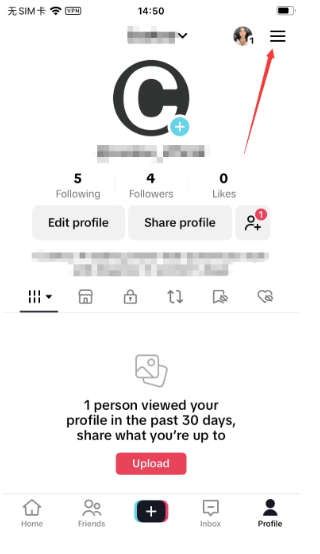
Go to your TikTok profile page (Profile), and tap the prominent button in the upper-right corner of the page. [Three Horizontal Lines] menu button.
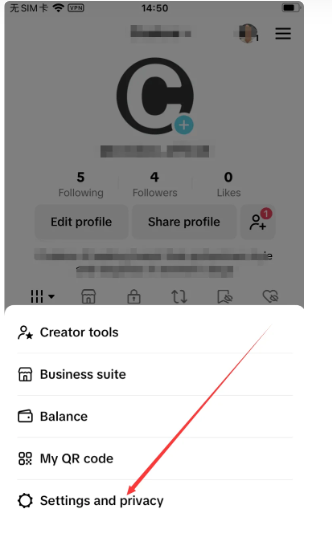
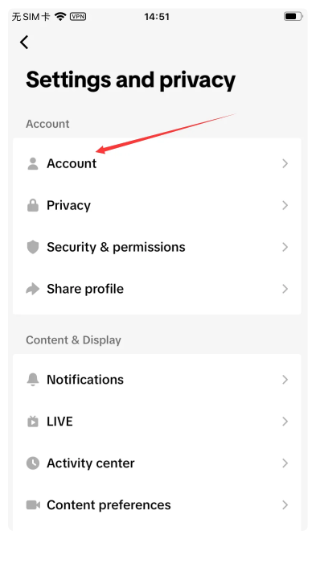
In the options that pop up below, tap the gear icon labeled 【Settings and privacy】(Settings and Privacy).
In the settings list, select the first item at the top: 【Account】(Account).
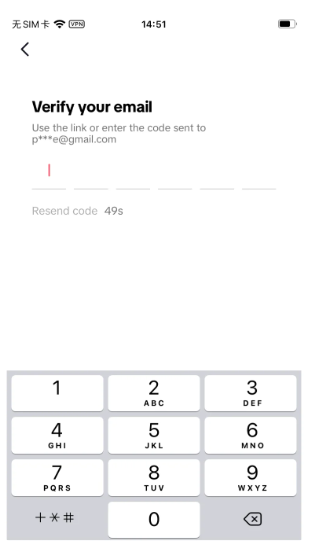
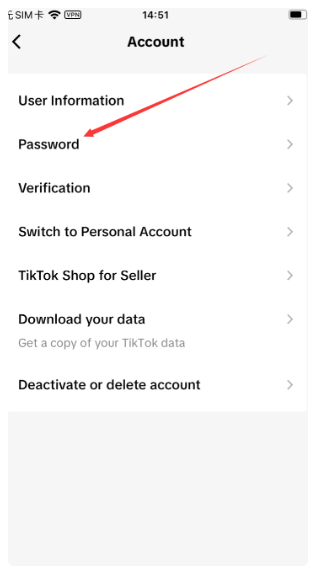
Tap 【Password】(Password). At this point, the system will automatically send a 6-digit security verification code to your currently bound email or overseas phone number.
Check your browser or email for the code and enter it, then input your newly set password in the reset password field and tap Confirm to take effect.